

Summary
Campaigns are definitions. Campaign runs are the actual execution history. The current app strongly separates those concerns, which is good. It means users can:- review the campaign as a reusable object
- inspect specific runs as operational events
- manage scheduling and status questions separately from general campaign editing
Who this is for
- Campaign managers
- Operators reviewing execution history
- Teammates debugging why a specific campaign run behaved differently from the campaign definition
Where to find it in the app
- Campaigns → Campaign Runs
- individual campaign run detail pages
- Campaigns → Goals
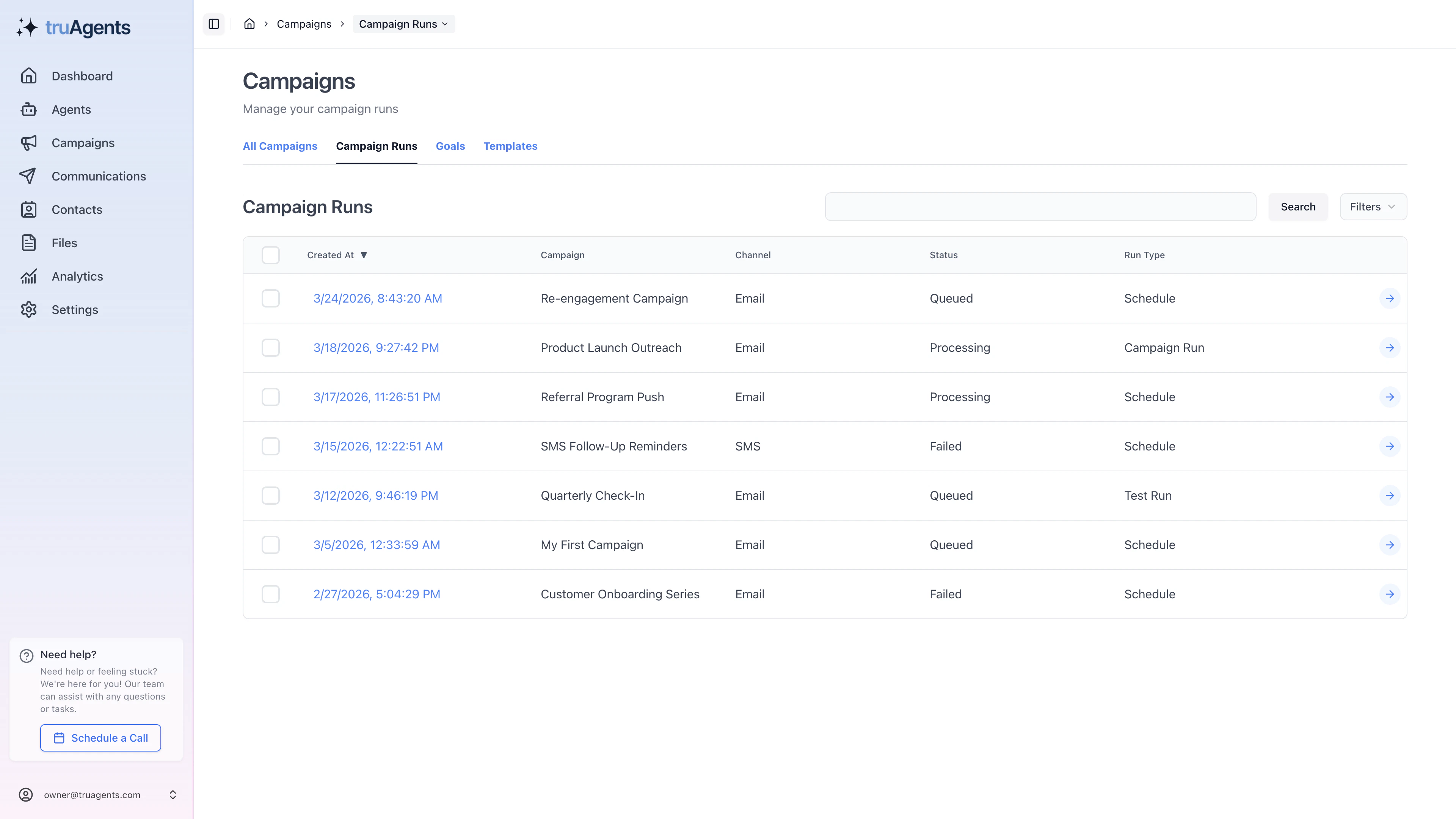
What the current campaign-run flow suggests
Runs listing
The runs list appears to support filtering, pagination, and sorting around:- created date
- campaign
- channel
- status
- run type
Run detail
The run detail view appears to be a rich operational page, not just a status page. It includes:- communications generated by the run
- replies related to the run
- run details and metadata
- instruction visibility
- version history
- status-aware actions like refresh, cancel, or reschedule in some cases
Goals
Goals appear to be reusable objects that can be created and managed separately. That suggests they should eventually be documented as part of campaign strategy and reuse, not just as one more settings page.Recommended run-review sequence
- start with the run list to find the run you care about
- open the run detail and confirm status, type, and timing
- review the communications created by that run
- check replies, version history, and instruction context if results look off
- decide whether the lesson belongs in the campaign definition, the goal, or the execution context
Example: campaign versus run confusion
If a message outcome looks wrong, do not assume the base campaign definition is automatically the culprit. Check whether the issue is actually tied to:- the specific run timing
- a scheduled or queued state
- a later version of instructions
- downstream draft or reply behavior
How to think about goals
Goals should usually answer “what is this campaign trying to achieve?” in a reusable way. Simple version:- campaign = the working setup
- goal = the objective behind it
- run = one actual execution of that setup
Success checklist
- Teams know the difference between a campaign and a campaign run.
- Users can review run status, communications, and replies in one workflow.
- Scheduled or queued runs are treated differently from completed runs.
- Goals are understood as reusable campaign intent, not just miscellaneous metadata.