

Summary
Campaign work does not end when a campaign is created. In the current app, campaigns have a real lifecycle:- create the campaign
- review or refine it later
- test it safely
- run or schedule it deliberately
- inspect resulting runs, communications, and replies afterward
Who this is for
- Campaign managers
- Operators refining active or draft campaigns
- Teammates reviewing campaign setup before or after launch
Where to find it in the app
- Campaigns
- Campaigns → Create
- Campaign Runs
- Goals
- Templates
What the campaigns area supports
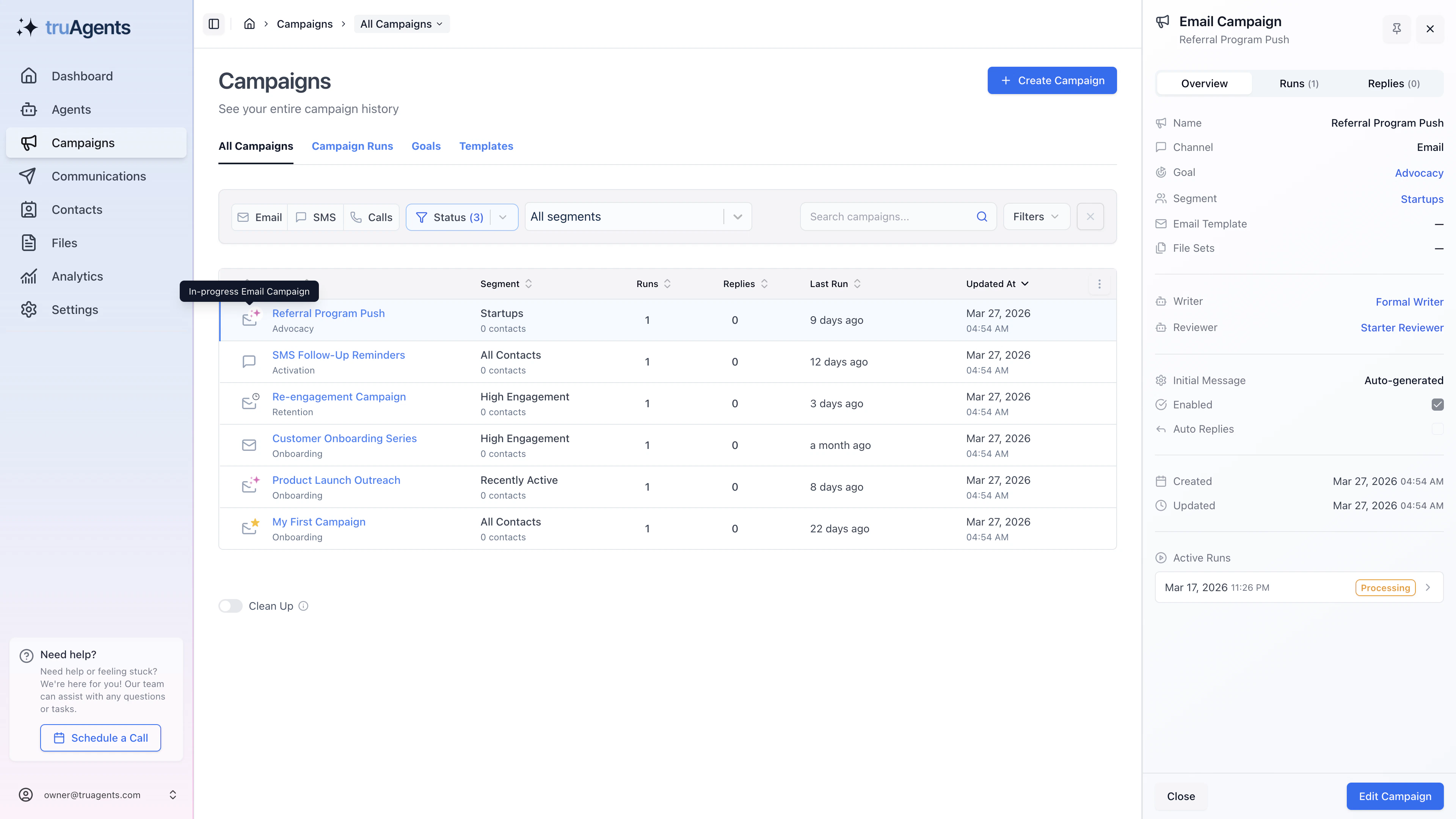
From the current app structure, the campaigns area supports:- campaign creation
- table-based review of all campaigns
- opening campaign overview panes
- reviewing campaign run history
- reviewing replies and communications tied to a campaign
- navigating to related segments
The supporting objects you need to understand
Goals
Goals define the intended outcome or messaging purpose of a campaign. In practice, they are part of the required campaign setup rather than optional metadata.Campaign runs
A campaign is the reusable definition. A campaign run is a specific execution of that definition. Simple version:- campaign = the plan
- campaign run = one actual attempt to execute the plan
Templates
Email campaigns are more dependent on templates than SMS or phone flows. The current preflight rules show that email runs usually require a template, while SMS and phone do not.What to verify before a campaign can run
The product already enforces real preflight checks. A campaign run can fail because key pieces are missing.Channel-specific gotchas
- reviewer is required
- template is normally required
- segment is required for real outbound runs
SMS
SMS still requires campaign structure and review discipline, but it does not depend on an email template.Calls / phone
Phone runs appear to be more permissive in the current preflight rules. For example, reviewer is not required there in the same way it is for email.A practical campaign editing workflow
- Create or open a campaign.
- Review the campaign’s audience, instructions, and operational state.
- Check whether the goal, writer, reviewer, template, and segment are all present where needed.
- Decide whether the campaign should stay inactive, be test-run, be scheduled, or be run now.
- Revisit the campaign later through the campaigns table to inspect history and live impact.
Safe progression path
When to use test runs versus real runs
The current product distinguishes betweentest_run, run, and schedule.
- use a test run when you want to validate behavior without treating the campaign as fully launched
- use a real run when the audience and configuration are ready now
- use schedule when the configuration is ready but timing matters
What to review after editing
- whether the audience still matches the goal
- whether the selected channel still makes sense
- whether the writer and reviewer setup still reflects how the team wants content handled
- whether the campaign should remain inactive while the team reviews it
- whether later runs can be explained by the campaign configuration you see now
Common mistakes
- assuming a campaign record is “ready” just because it exists
- forgetting that outbound runs need a segment
- discovering missing goal, writer, or reviewer settings only at run time
- treating email, SMS, and phone as if they have identical requirements
- looking only at the campaign definition and never checking the actual run and communications outcome
Success checklist
- Campaigns are easy to identify and review later.
- The team understands the difference between a campaign and a campaign run.
- The team understands how to move from campaign definition to campaign runs.
- The goal, writer, reviewer, template, and segment expectations are understood before launch.
- A campaign can be connected back to segments and resulting communications behavior.
- Editing a campaign does not depend on undocumented internal assumptions.