

Summary
TruAgents public APIs are authenticated with OAuth 2.0client_credentials (RFC 6749 §4.4). A partner application exchanges a long-lived client_id + client_secret for a short-lived access token, then sends the access token on every API request.
The authorization server is operated by TruAgents — there is no external identity provider to register with. All requests to the token endpoint and the API must use HTTPS. Never send credentials over unencrypted connections.
Machine-readable specification
The OAuth 2.0 token endpoint described on this page —POST /oauth/token, with client_credentials and refresh_token grants — is included in TruAgents’ single OpenAPI 3.0.3 specification, which also covers the Unsubscribe API. Generate client SDKs from it, or import it into Postman / Insomnia for interactive exploration.
OpenAPI specification
Download
truagents.json — covers POST /oauth/token and all six /api/v1/unsubscribe/{email,sms,phone} operations.Building in Python? The first-party
truagents SDK handles token acquisition, refresh rotation, and family-revoke recovery automatically. Run pip install truagents to skip hand-rolling the flow below.Who this is for
Engineers integrating an external service with a TruAgents public API (today: Unsubscribe API). The credential is issued for a set of organizations in TruAgents — one or more — with one organization designated as the default. Per-request targeting within the authorized set, default-when-omitted behavior, and any per-API authorization rules are documented on the API-specific integration page.Endpoints
Each environment has independent credentials — a
client_id issued in development does not authenticate in production.
Credentials
Each integration is authenticated by aclient_id + client_secret pair. The full client_secret is shown once at creation and never again — copy it into your secret store immediately. A short prefix (tru_cs_…) remains visible afterwards for identification in the admin UI.
To view and manage your API keys, go to Settings → API Keys (Beta):
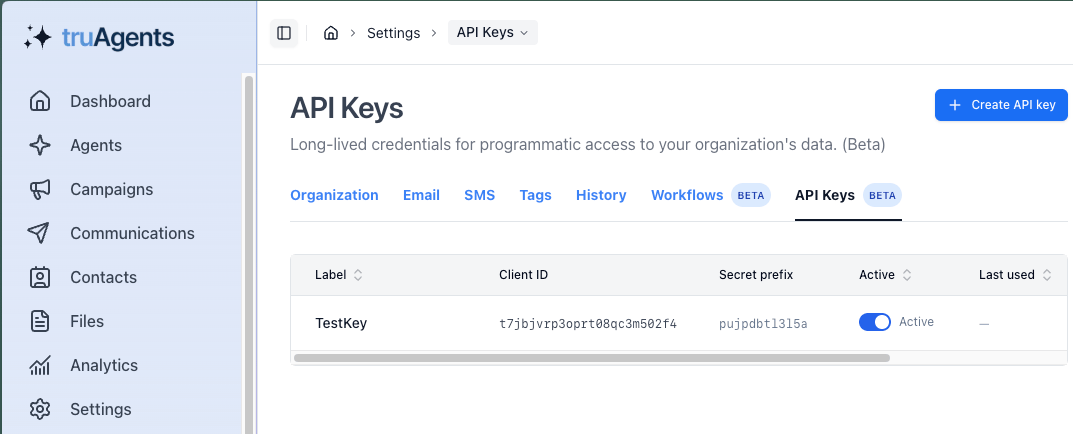
Rotation is an administrator action today: a new key is provisioned, you switch your store, and the previous key is deactivated. Deactivated keys reject all
/oauth/token requests immediately, and all access and refresh tokens issued from them are revoked at the same moment.
Step 1 — Request an access token
Exchange yourclient_id + client_secret for an access token using the client_credentials grant. Send the credentials in the HTTP Authorization header:
If your HTTP client cannot set the
Authorization header, credentials may be sent as body parameters (RFC 6749 §2.3.1) — this method is less safe because the client_secret is more likely to appear in server access logs, reverse-proxy logs, and exception traces. Prefer the Authorization header form.
Store the
access_token in memory — losing it on restart just costs one extra /oauth/token call. Store the refresh_token durably alongside your client_secret: it must survive process restarts and must be updated atomically every time you refresh, because the previous value is invalidated by rotation (see Refresh-token rotation).
Step 2 — Call the API
Send the access token in theAuthorization header on every request to the API base:
401 Unauthorized with a WWW-Authenticate header per RFC 6750 §3:
401 as a signal to refresh — see Step 3.
Step 3 — Refresh the access token
Use therefresh_token grant to obtain a new access token without re-sending the client_secret:
access_token and a new refresh_token:
Refresh-token rotation
Every successful refresh issues a new refresh token and invalidates the previous one. You must store the latest value returned. This is a breach-detection mechanic: if a previously-used refresh token is presented again, TruAgents assumes it was stolen and revokes every active access and refresh token for thatclient_id. The integration must re-authenticate via client_credentials (Step 1).
Concurrency. Refresh tokens are single-use. If your first refresh request
succeeded but you didn’t receive the response, do not reuse the refresh
token — retry the API call with
client_credentials (Step 1) to start a new
session. Reusing a rotated refresh token, whether by a retry after a lost
response or by a second worker holding the same stored value, is treated as
evidence of theft: TruAgents revokes every active access and refresh token for
the client_id and you must re-authenticate. If your integration runs
multiple workers, serialize refresh calls per client_id (for example, with a
mutex or a leader-elected refresher) so only one worker ever presents the
current refresh token.When the refresh token is gone
The refresh token can be unusable for three reasons:- It has expired (30 days since issuance).
- It has been rotated (you already used it for a refresh) — any reuse revokes the family.
- Your administrator deactivated the
client_idor rotated theclient_secret.
POST /oauth/token with grant_type=refresh_token returns 400 invalid_grant. Fall back to Step 1 (client_credentials) to start a new session.
Renewal pattern
Use the reactive pattern — send the request with the access token you hold, refresh on401. The TruAgents authorization server is the authoritative clock, which avoids the drift bugs a proactive expiry check introduces.
expires_in against a local clock) is also acceptable — keep the 401 retry path as a fallback for clock drift and mid-cycle revocation.
Error responses
/oauth/token returns standard OAuth 2.0 error envelopes per RFC 6749 §5.2:
API endpoints return
401 with WWW-Authenticate: Bearer error="invalid_token" when the access token is missing, expired, or revoked. See the integration page (e.g. Unsubscribe API) for per-resource error codes.
Rate limits
The token endpoint and API endpoints have independent rate limits applied perclient_id. Exceeding a limit returns 429 Too Many Requests with a Retry-After header.
Limits are scoped to the
client_id as a whole — they do not split per organization when one credential is authorized across several organizations. If your integration fans across many organizations and the default ceiling is too tight, contact your TruAgents administrator to request a bump.
Future auth methods
The token endpoint is structured to accept additional transport-layer protections alongsideclient_secret_basic. This is roadmap-only — not available at v1:
- Optional mTLS transport binding — TruAgents may pin a client certificate to the
client_idas an additional transport-layer identity check, layered on top ofclient_secret_basic. Not a replacement for the shared secret.
What this page does not cover yet
- A discovery document at
/.well-known/oauth-authorization-server(RFC 8414). - Token introspection (RFC 7662) — clients do not need it for the current public APIs.