> ## Documentation Index
> Fetch the complete documentation index at: https://docs.truagents.com/llms.txt
> Use this file to discover all available pages before exploring further.
# Send webhook step
> Send the contact and communication from a workflow to Zapier, Make, your CRM relay, or any HTTPS endpoint.
## Summary
The **Send webhook** step sends the details of a workflow run to a URL you choose. When the workflow reaches the step, TruAgents sends one HTTPS `POST` with the contact, the inbound communication, and links back to TruAgents.
Use it to hand work to systems outside TruAgents. For example, you can create a lead in your CRM, post to a team channel through Zapier or Make, or open a ticket.
You choose the destination and optional headers. The body is fixed. The [Webhooks reference](/developers/webhooks) describes every field.
## Who this is for
Admins and operators building workflows. You need the URL of a receiving endpoint. Usually a developer, or a Zapier or Make scenario, provides it.
## Before you start
* You can create or edit workflows (Owner, Admin, or Editor role).
* You have an `https://` endpoint URL on the public internet. No-code tools generate one for you:
* **Zapier**: a **Webhooks by Zapier** trigger with the **Catch Hook** event.
* **Make**: a **Webhooks** module with the **Custom webhook** trigger.
* If the endpoint expects a token, you have one that is dedicated to this webhook and unlocks nothing else. Header values are visible to everyone in your organization who can open the workflow.
## Add the step
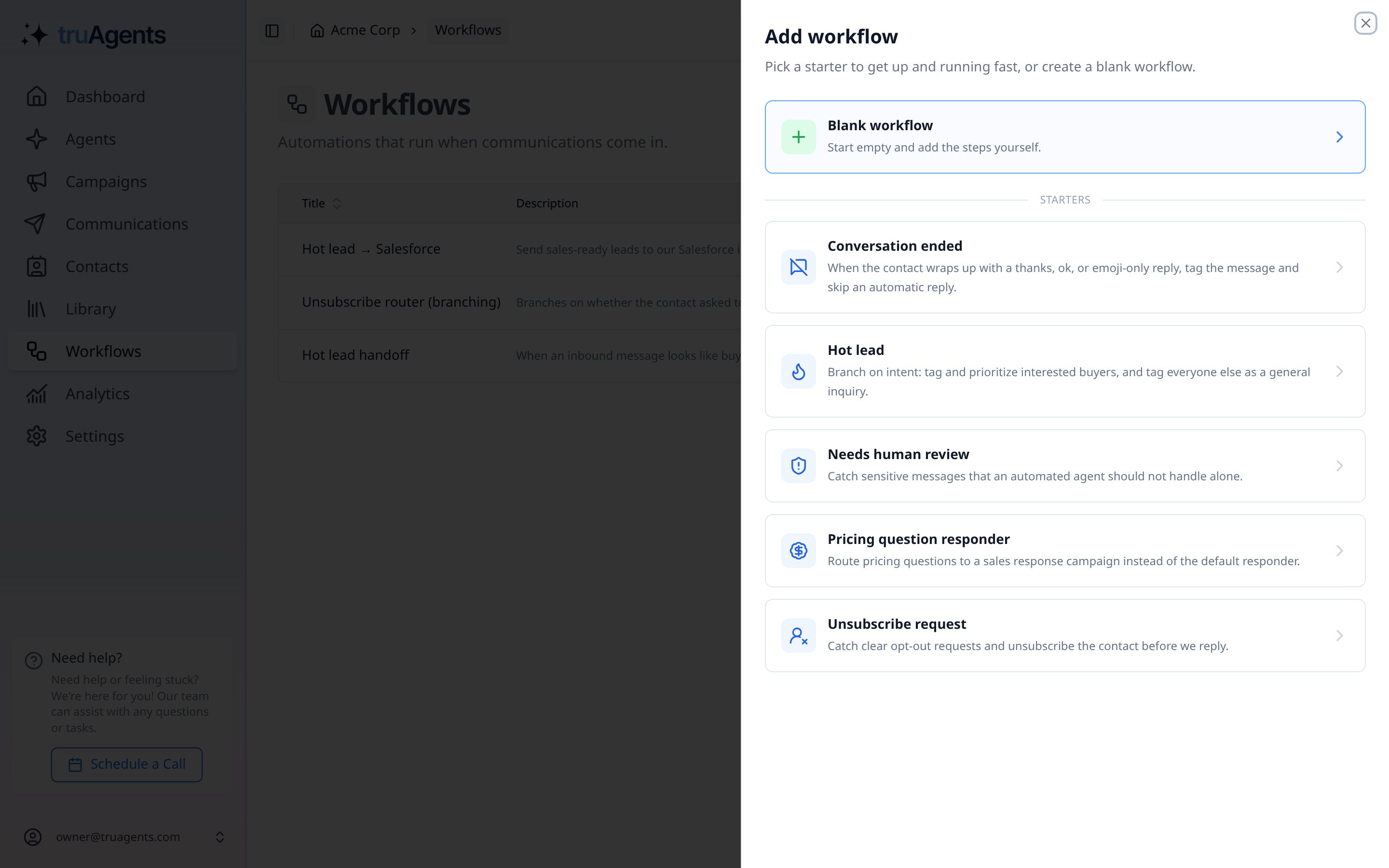
Go to **Workflows**. Open an existing workflow, or click **+ Add Workflow** and pick a starter. The **Hot lead** starter is a good base for sending sales-ready leads to a CRM.
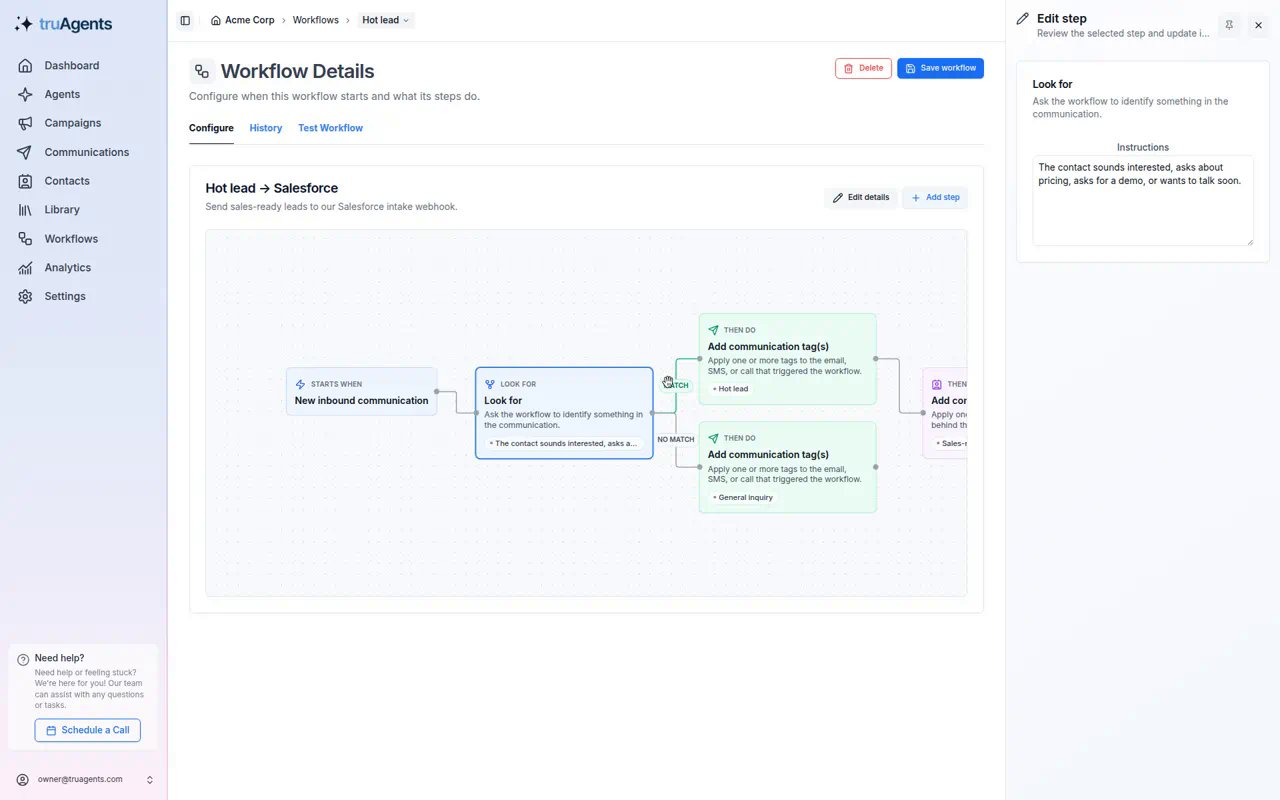
 Click the **Look for** step and describe in plain English what a match looks like. Only communications that reach the step's branch send a webhook. Put the webhook on the **MATCH** branch to send only matching communications.
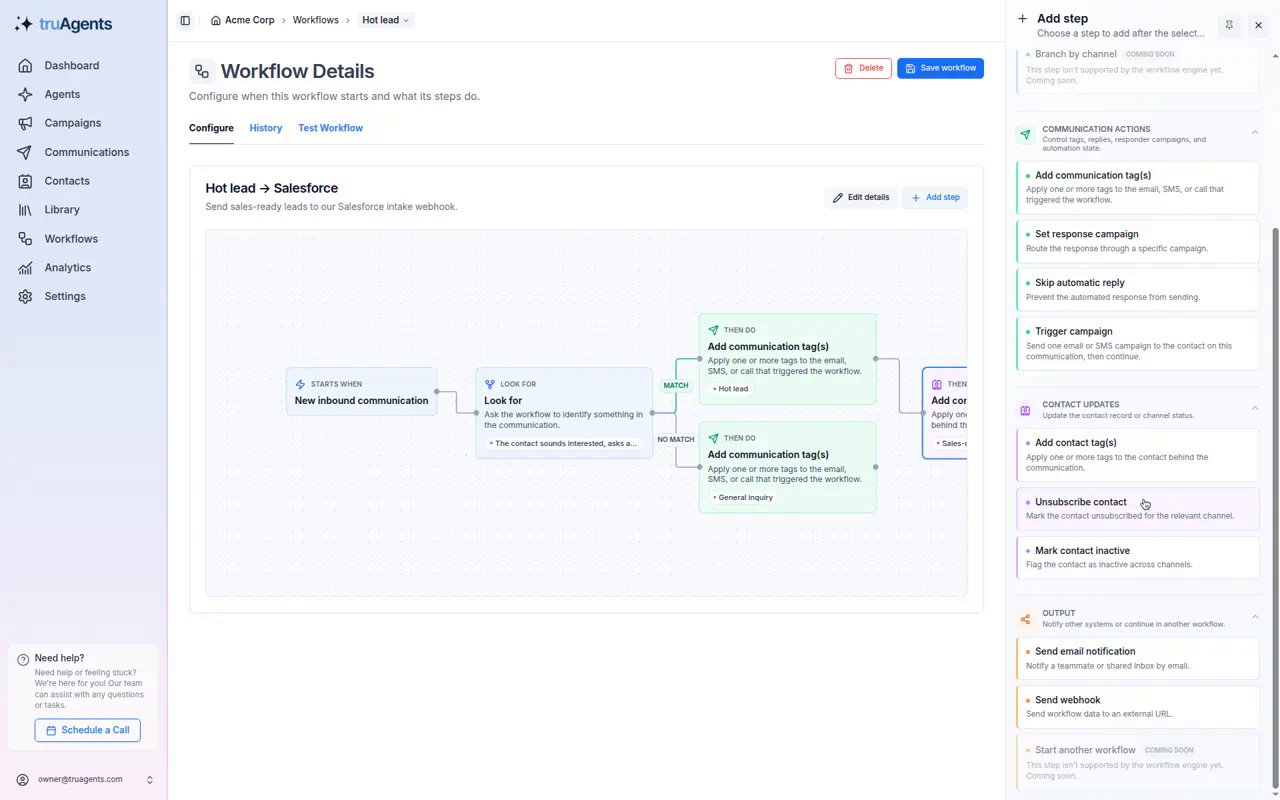
 Click **+ Add step** on the canvas, or the add control after the step that should come before the webhook. Under **Output**, choose **Send webhook**.
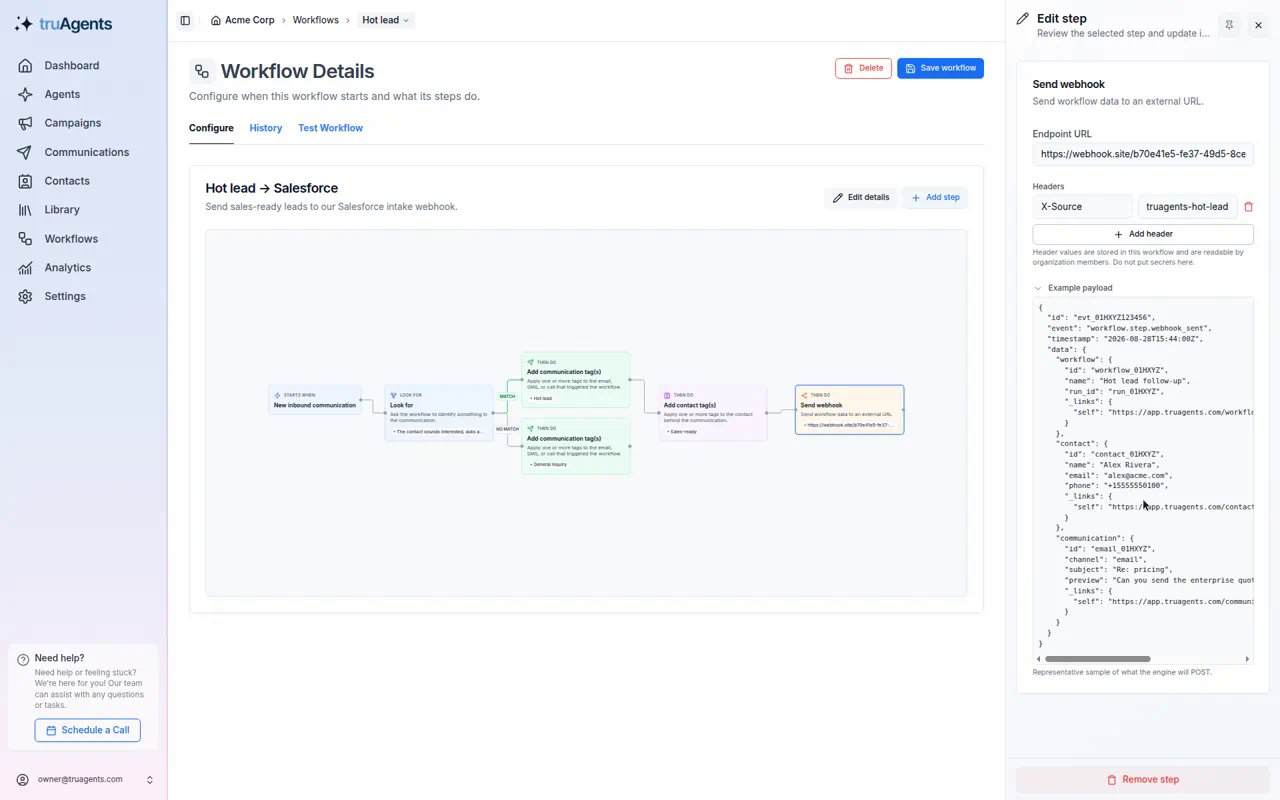
 In the **Edit step** panel:
* **Endpoint URL**: paste the `https://` URL from your receiver. The field shows "Enter a valid https\:// URL." until the URL is valid.
* **Headers** (optional): click **Add header** for anything your receiver expects, such as `X-Source: truagents-hot-lead` or a dedicated token. Leave `Content-Type` alone. TruAgents sends `application/json`.
* **Example payload**: expand it to see the shape of the body. Give this sample to whoever builds the receiver.
In the **Edit step** panel:
* **Endpoint URL**: paste the `https://` URL from your receiver. The field shows "Enter a valid https\:// URL." until the URL is valid.
* **Headers** (optional): click **Add header** for anything your receiver expects, such as `X-Source: truagents-hot-lead` or a dedicated token. Leave `Content-Type` alone. TruAgents sends `application/json`.
* **Example payload**: expand it to see the shape of the body. Give this sample to whoever builds the receiver.
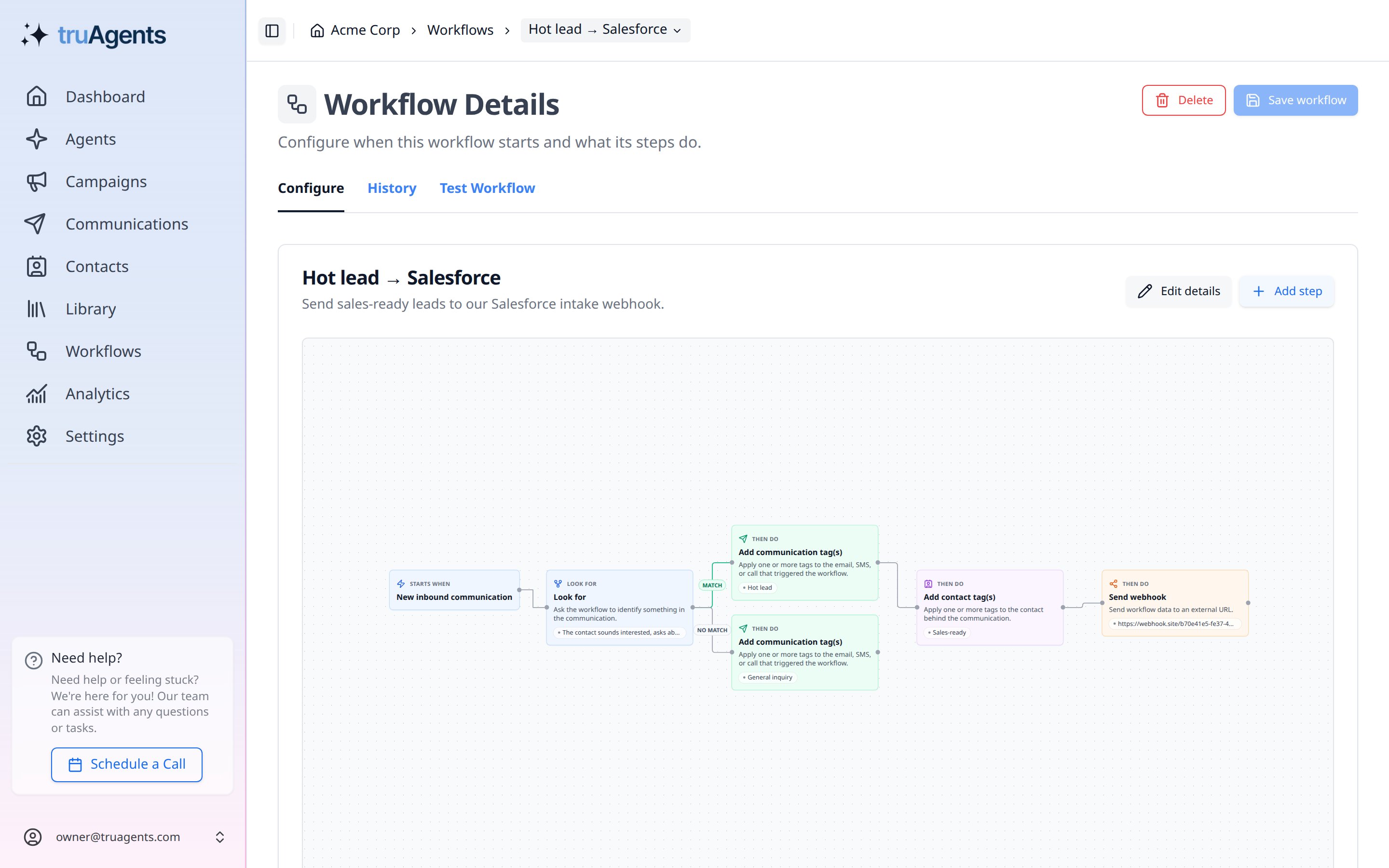
 Click **Save workflow**. The step shows on the canvas with its destination host.
 ## Test without sending
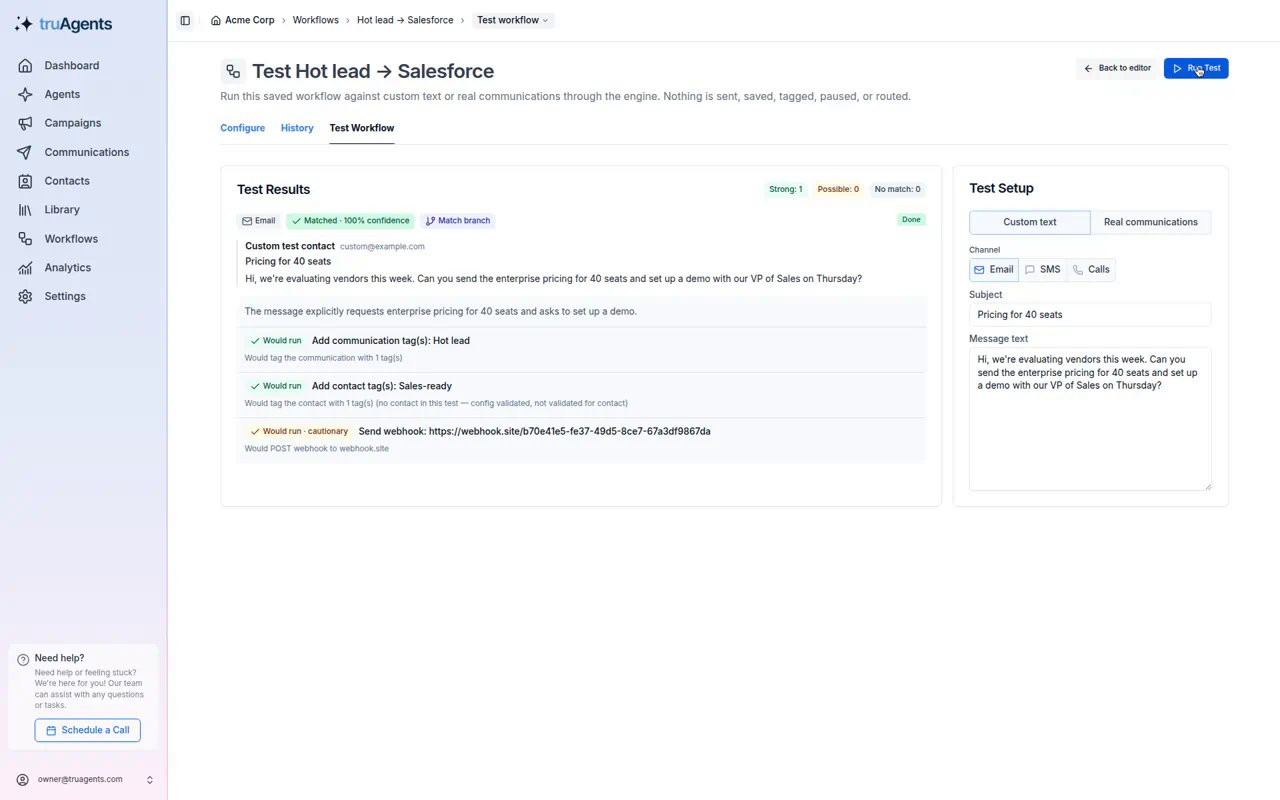
Open the **Test Workflow** tab, write or pick a sample communication, and click **Run Test**. Tests never send anything: the webhook step shows **Would run** and "Would POST webhook to ``", but no request is made.
Test both sides:
* a message that should match. The webhook step appears on the result.
## Test without sending
Open the **Test Workflow** tab, write or pick a sample communication, and click **Run Test**. Tests never send anything: the webhook step shows **Would run** and "Would POST webhook to ``", but no request is made.
Test both sides:
* a message that should match. The webhook step appears on the result.
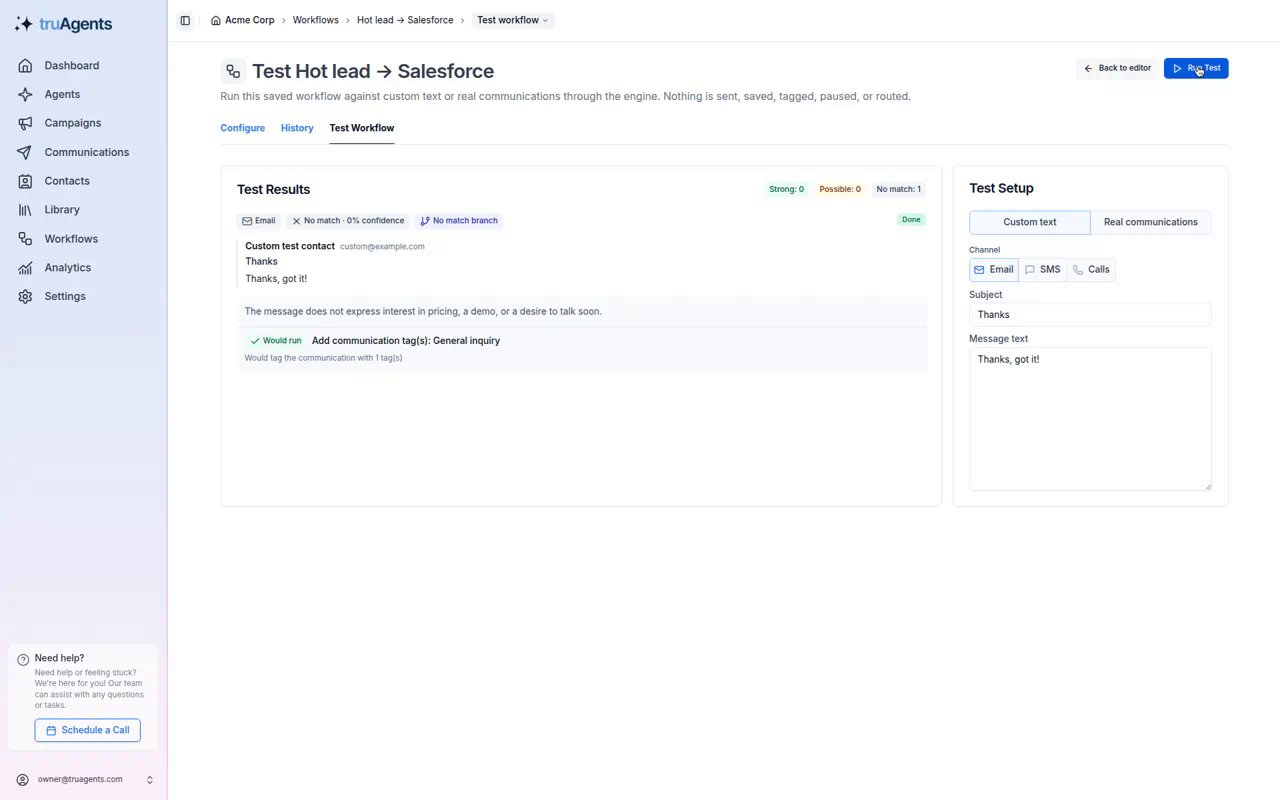
 * a message that shouldn't match. The webhook step doesn't appear.
 To see a real request before your receiver is ready, point the step at a request inspector such as [webhook.site](https://webhook.site), then send a test email to your TruAgents inbox. Switch to the real URL afterwards. Don't use an inspector with real customer data.
## Go live
1. On the **Workflows** list, set the workflow to **Active**. Inactive workflows never run.
2. Wait for a real communication, or send one yourself.
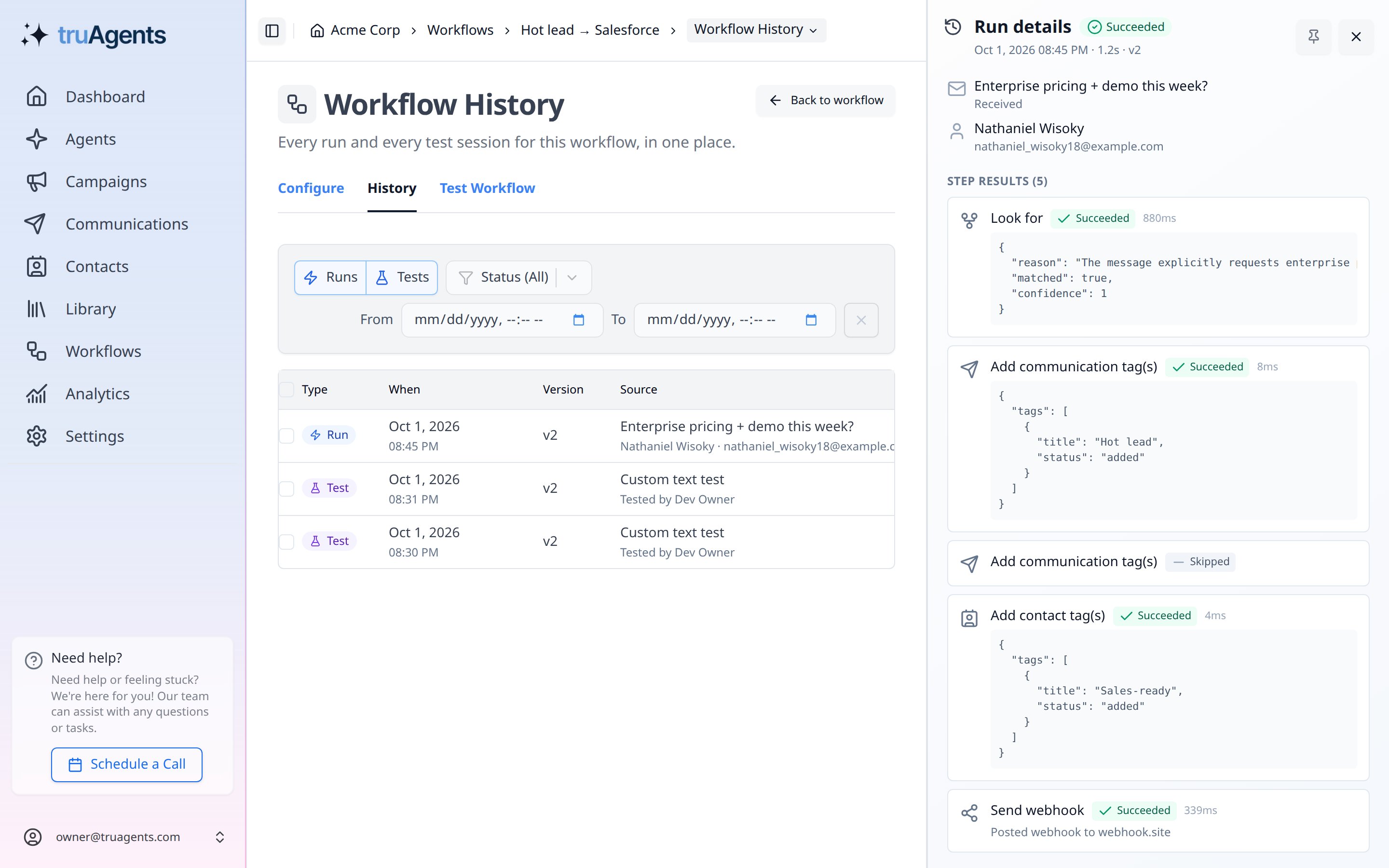
3. Open **History** and click the run. The **Send webhook** step shows **Succeeded** with "Posted webhook to ``".
To see a real request before your receiver is ready, point the step at a request inspector such as [webhook.site](https://webhook.site), then send a test email to your TruAgents inbox. Switch to the real URL afterwards. Don't use an inspector with real customer data.
## Go live
1. On the **Workflows** list, set the workflow to **Active**. Inactive workflows never run.
2. Wait for a real communication, or send one yourself.
3. Open **History** and click the run. The **Send webhook** step shows **Succeeded** with "Posted webhook to ``".
 ## If something goes wrong
| What you see | What it means | What to do |
| - | - | - |
| Step **Failed**: "The webhook endpoint rejected the request" | The receiver returned `3xx`, or `4xx` other than `408` and `429`. | Check the receiver's logs or history. Common causes are a wrong URL, a missing or wrong token header, or a paused Zap or scenario. |
| Step **Failed**: "Webhook URL must use HTTPS" | The URL starts with `http://`. | Use the `https://` URL. |
| Step **Failed**: "Webhook URL is not allowed" | The host is private, `localhost`, or internal. | Use a public endpoint. |
| Run stays **Running** | The receiver returned `5xx`, `408`, or `429`, timed out, or couldn't be reached. TruAgents keeps retrying for up to 24 hours. | Fix the receiver. The next retry delivers the same event. See [Failures and retries](/developers/webhooks#failures-and-retries). |
| Nothing in **History** | The workflow didn't run. | Check that it's **Active** and that the trigger matches the channel. |
While a webhook is being retried, the automatic reply and any later workflows for that communication wait. A broken endpoint can delay replies for up to 24 hours, so watch new webhooks closely in the first few days.
## Success checklist
* [ ] The endpoint URL is `https://` and public.
* [ ] No header contains a password or a credential for another system.
* [ ] A matching test shows "Would POST webhook to ``", and a non-matching test doesn't.
* [ ] The workflow is **Active**.
* [ ] A real run shows **Succeeded** on the **Send webhook** step, and the record arrived in the destination.
## Related pages
* [Send hot leads to Salesforce](/automations/hot-leads-to-salesforce), with guides for a [relay](/automations/salesforce-relay), [Zapier](/automations/salesforce-zapier), and [Make](/automations/salesforce-make)
* [Webhooks reference](/developers/webhooks)
* [Workflow automations overview](/automations/overview)
This documentation is built and hosted on [Mintlify](https://mintlify.com), a developer documentation platform.
## If something goes wrong
| What you see | What it means | What to do |
| - | - | - |
| Step **Failed**: "The webhook endpoint rejected the request" | The receiver returned `3xx`, or `4xx` other than `408` and `429`. | Check the receiver's logs or history. Common causes are a wrong URL, a missing or wrong token header, or a paused Zap or scenario. |
| Step **Failed**: "Webhook URL must use HTTPS" | The URL starts with `http://`. | Use the `https://` URL. |
| Step **Failed**: "Webhook URL is not allowed" | The host is private, `localhost`, or internal. | Use a public endpoint. |
| Run stays **Running** | The receiver returned `5xx`, `408`, or `429`, timed out, or couldn't be reached. TruAgents keeps retrying for up to 24 hours. | Fix the receiver. The next retry delivers the same event. See [Failures and retries](/developers/webhooks#failures-and-retries). |
| Nothing in **History** | The workflow didn't run. | Check that it's **Active** and that the trigger matches the channel. |
While a webhook is being retried, the automatic reply and any later workflows for that communication wait. A broken endpoint can delay replies for up to 24 hours, so watch new webhooks closely in the first few days.
## Success checklist
* [ ] The endpoint URL is `https://` and public.
* [ ] No header contains a password or a credential for another system.
* [ ] A matching test shows "Would POST webhook to ``", and a non-matching test doesn't.
* [ ] The workflow is **Active**.
* [ ] A real run shows **Succeeded** on the **Send webhook** step, and the record arrived in the destination.
## Related pages
* [Send hot leads to Salesforce](/automations/hot-leads-to-salesforce), with guides for a [relay](/automations/salesforce-relay), [Zapier](/automations/salesforce-zapier), and [Make](/automations/salesforce-make)
* [Webhooks reference](/developers/webhooks)
* [Workflow automations overview](/automations/overview)
This documentation is built and hosted on [Mintlify](https://mintlify.com), a developer documentation platform.